PDF Burrow
Formerly PDF Den — on Google Play as “PDF Den” until the next update
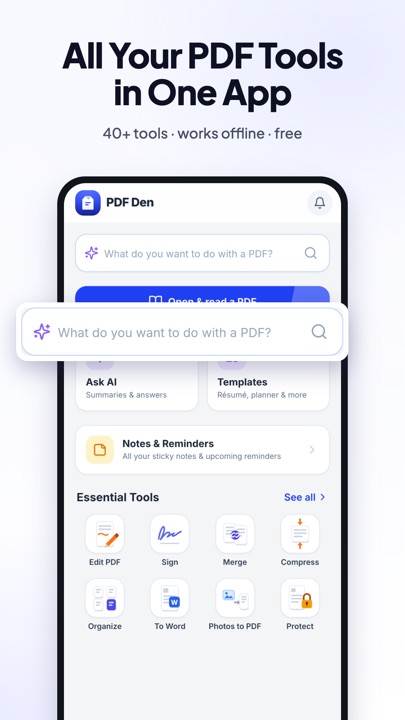
Scan, merge, compress, convert, sign, edit and protect PDFs — 49 tools that run on your phone. Your files are never uploaded.
On-device
Files are processed on your phone, not on a server.
14 languages
Including Arabic and Urdu, right to left.
No account
Open the app and start — no sign-up.
All 49 tools
Scan 3
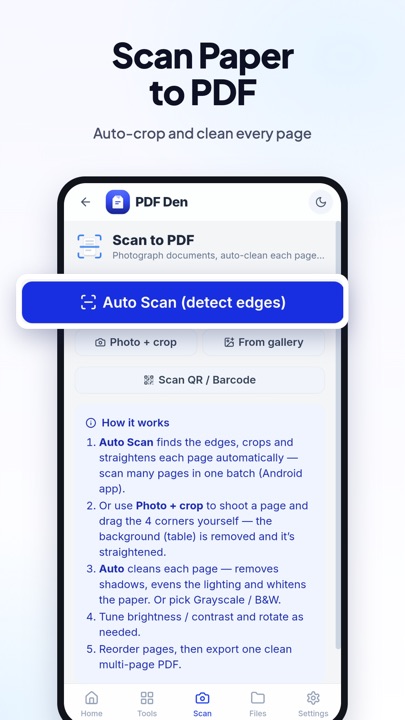
- Scan to PDFPhotograph documents, auto-clean each page, export one PDF.
- Make Searchable (OCR)Turn scanned pages into selectable, searchable text — on device.
- Bills & ReceiptsScan a bill, receipt or flyer — get the due date & amount, a reminder, calendar entry or expense log.
Organize 10
- Merge PDFCombine several PDF files into one document.
- Organize PagesReorder, rotate or delete pages — or pick the ones to keep as a new PDF.
- Crop / Trim PagesDrag the frame on the page to trim margins — live, non-destructive.
- Resize PagesFit every page to a standard size (A4, Letter, Legal…).
- Bookmarks / TOCBuild a table of contents readers show in their sidebar.
- Print PDFSend a PDF to a printer or “Save as PDF” — right from the app.
- Voice CommandsSay what to do — "delete page 3, compress under 1 MB and WhatsApp it" — and it runs, step by step.
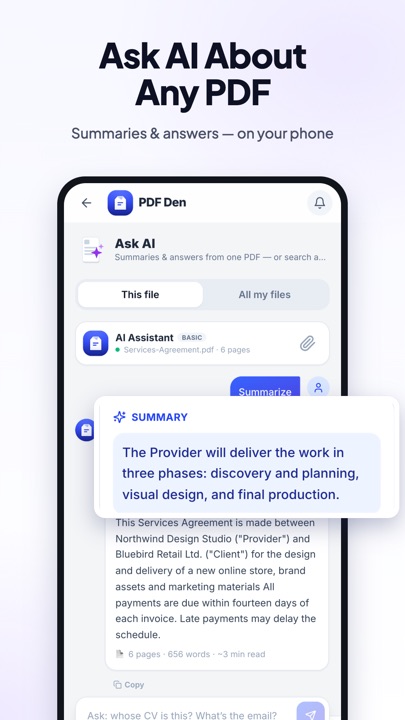
- Ask AISummaries & answers from one PDF — or search across all your files. On-device.
- Read Mode (Liquid)Reflow text to fit your screen — read PDFs like an ebook.
- Search in PDFFind any word or phrase across the document and jump to it.
Optimize 2
- Compress PDFReduce file size for easier sharing.
- Compress ImageShrink JPG / PNG photos to fit an upload limit like 100 KB.
Convert 9
- PDF to JPGTurn PDF pages into JPG images.
- Image to PDFCombine JPG / PNG images into one PDF — set page size, orientation & margins.
- ID Card to PDFPut the front & back of an ID card on one clean page.
- PDF to WordConvert to an editable .docx — keeps reading order, styles, colours and images.
- PDF to TextPull all the text out of a PDF — copy it or save a .txt file.
- PDF to PowerPointTurn each page into a slide — a ready-to-present .pptx.
- Text to PDFType or paste text — or load a .txt file — and make a clean PDF.
- PDFs to ZIPBundle one or several PDFs into a single .zip archive.
- TranslateTranslate a PDF, Word or text file into another language — on device, no cost.
Office 5
- Create InvoiceFill a form and get a polished invoice PDF — totals, tax & logo.
- File ViewerOpen & read Word, Excel, CSV and text files — export to PDF.
- Excel EditorOpen a spreadsheet, edit cells, add or delete rows, save as .xlsx.
- Word EditorOpen a .docx, edit the text & basic formatting, save as Word.
- TemplatesStart from a ready-made template — résumé, planner, invoice & more.
Edit 14
- Add WatermarkStamp diagonal text across every page.
- Page NumbersAdd automatic page numbers to a PDF.
- Header & FooterAdd custom headers/footers — text, page numbers, date, per corner.
- Edit PDFTap to edit text in place or swap photos — right on the page.
- Sign PDFDraw your signature once, then tap to place it on any page.
- Add HyperlinksMake any text or image a clickable link to a URL or email.
- Fill FormsFill interactive PDF forms — text, checkboxes, radios, dropdowns.
- Highlight & AnnotateHighlight, underline, strike-through, add sticky notes or draw.
- Sticky NotesStick private notes on any page — they reappear when you re-open the PDF.
- Add TextStamp custom text onto PDF pages.
- Add ImagePlace a logo, signature or photo onto a PDF.
- Edit MetadataChange the PDF's title, author and subject.
- Fill Form by VoiceThe phone asks each question aloud; answer in your language and it goes into the right box.
- PDF InfoInspect metadata, page count and size.
Security 6
- Check DocumentSpot signs of editing in a salary slip, bill or bank statement — and re-add its totals.
- Safe for AIHide your name, CNIC, phone & accounts before sending a PDF to ChatGPT — then put them back in the answer.
- Password ProtectEncrypt your PDF so only people with the password can open it.
- Unlock PDFRemove password protection and restrictions.
- Flatten PDFLock in forms, annotations, watermarks & signatures permanently.
- Redact PDFPermanently black out sensitive text or areas — truly removed.
Free on Android. Questions? Contact support.